Docs
Automation Packs
Switch workflow bundles Effi can plan and run with your approval
On this page▼
Automation Packs
Packs bundle workflows — actions Effi can plan and run with your approval (for example overdue payment reminders or duplicate expense checks). Unlike Rules, you do not turn each workflow on or off on this page; you choose a pack as a set.
Where to find it
Effi Automation → Packs tab.
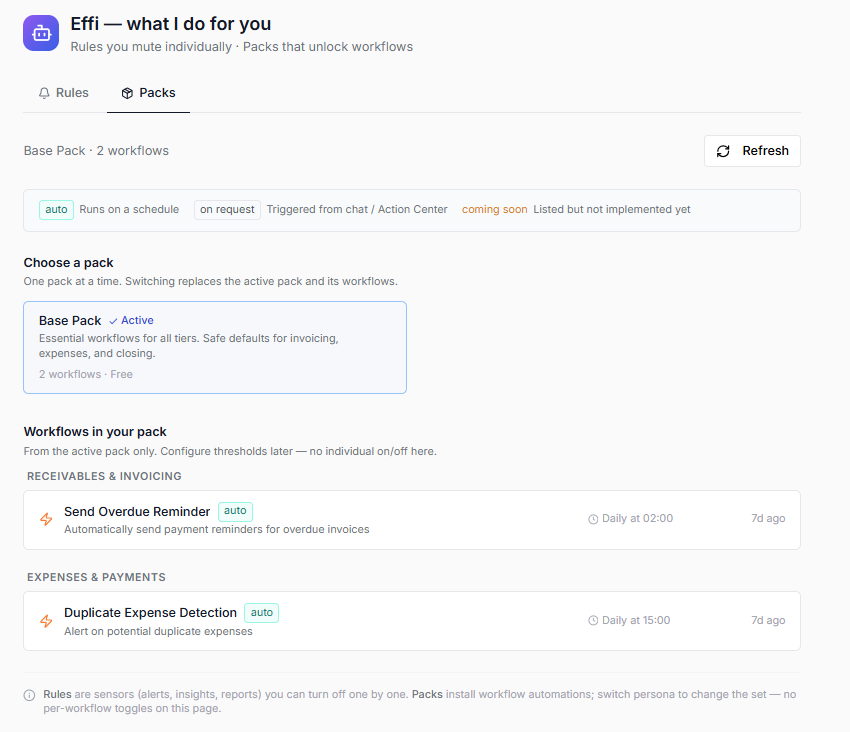
In short: Rules are checks; Packs install workflows.
What you can do
- See which pack is active
- See workflows included in the pack, grouped by area
- Switch pack when more than one pack is offered for your plan
- Approve or dismiss workflow goals in the Action Center or chat
Packs available today
Base Pack
Available on Free and Pro. Sensible defaults for invoicing and expenses. Includes workflows such as:
- Send overdue reminder — draft and send payment reminders for overdue invoices (with your approval)
- Duplicate expense detection — flag possible duplicate expenses
Only packs shown in the app can be selected. More packs may appear later for your workspace.
Typical workflows
See what your pack unlocks
- Open Effi Automation → Packs
- Review the active pack and its workflow list by section
- Note which areas (receivables, expenses, and so on) have workflows
Switch pack (when multiple are listed)
- Open the Packs tab
- Choose another available pack
- Confirm the switch — the workflows update to that pack’s set
Run a pack workflow
- Ask Effi in chat (for example to send overdue reminders), or wait for a scheduled goal
- Review the proposed plan in chat or Action Center
- Approve to continue, or dismiss if you do not want it
Many pack workflows send emails to clients and need your approval before sending. See Invoice overdue reminders for a full walkthrough.
How Packs relate to Rules
| Rules | Packs | |
|---|---|---|
| Control | Per-rule On/Off | Switch whole pack |
| Typical result | Alerts, insights, inbox reports | Goals with steps (often email or multi-step) |
| Example | Overdue invoices monitor | Send overdue reminder workflow |
You usually want both: Rules to notice problems, Packs to act with your say-so.
Notes
- There are no per-workflow on/off switches on the Packs tab today
- If only Base Pack is listed, that is expected until more packs are rolled out
- Turning off a related Rule does not remove the pack workflow — they are separate controls
FAQ
Can I turn off just one workflow inside a pack?
Not on this page. Packs switch as a bundle. Use Rules to mute individual checks; for workflows, approve or dismiss each goal as it appears.
Do pack workflows use AI credits?
Planning and running AI-assisted goals can use credits. Check Settings → Subscription.
Where do I approve a reminder email before it goes out?
In the Action Center (Goals) or in the chat approval panel when Effi presents the plan.
Related
- Effi Automation — overview
- Automation Rules — checks
- AI Workflows — goals and approvals