Docs
Automation Rules
Enable or mute Effi’s scheduled checks for invoices, expenses, cash, and controls
On this page▼
Automation Rules
Rules are Effi’s background checks. They run on a schedule (or after certain events), look at your workspace data, and can raise alerts, update insights, or deliver a report. Turn them off individually when you do not need that check.
Where to find it
Effi Automation → Rules tab.
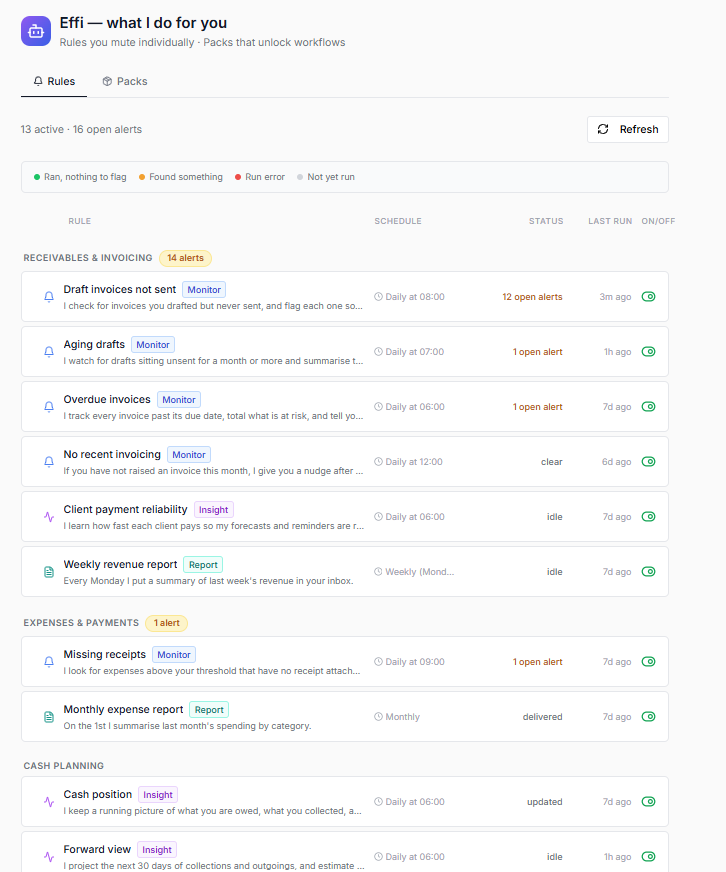
Rules are grouped into sections:
- Receivables & invoicing
- Expenses & payments
- Cash planning
- Month-end & closing
- Approvals & controls
Rule kinds
Each row shows a kind badge:
| Kind | What it does |
|---|---|
| Monitor | Watches for problems (for example overdue invoices or missing receipts) and can open alerts |
| Insight | Keeps a running picture (for example how clients pay, or cash position) |
| Report | Delivers a summary (for example weekly revenue) to your inbox or via chat |
| Action | Can suggest a follow-up goal (rare on the Rules tab today) |
What you can do
- Read the rule name and short description
- See Schedule (daily / weekly / monthly, or on request)
- See Status (waiting for first run, clear, open alerts, delivered, error)
- See Last run time
- Toggle On/Off to enable or disable the rule
Typical workflows
Review what is enabled
- Open Effi Automation → Rules
- Scan each section
- Note any rule with open alerts — those need attention in the Action Center
Turn a rule off
- Find the rule
- Click the On/Off control so it is off
- The row appears muted; Effi will not run that check until you enable it again
Schedules
Most rules run on a fixed daily, weekly, or monthly schedule (times shown on the row). A few are on request — they do not run by themselves; ask Effi in chat when you need them (for example the audit trail report).
You cannot change schedule times in the app today.
Notes
- Some rules require Pro (for example no recent invoicing, client payment reliability, weekly revenue report, monthly expense report, forward view, audit trail report)
- Open alerts stay visible in the Action Center even if you later turn the rule off — turning it off only stops new runs
- Two monitors can both flag related invoices on purpose (they answer different questions)
FAQ
Why is a rule “waiting for first run”?
It has not finished a scheduled run yet after being turned on (or after workspace setup).
Can I change how sensitive a rule is?
Not in the app yet. You can only turn the rule on or off.
How are Rules different from Packs?
Rules are individual checks. Packs unlock workflow automations as a bundle — see Automation Packs.
Related
- Effi Automation — overview
- Automation Packs — workflow bundles